Two years ago, we showed you a jailbreak tweak calledCarPlay iOS, which allowed you to emulate the CarPlay head unit user interface directly on your jailbroken iPhone or iPad.
Although the tweak was limited due the nature of the features that come bundled in theCarPlayinterface, the developer has been working on a treat for those who liked playing with the original tweak;CarPlay iOS 2.0is now available in Cydia.

Demo the CarPlay UI directly on your iOS device
With the CarPlay UI on your iPhone, you may access the apps and features you would normally see on the head unit of a CarPlay-enabled vehicle.
With CarPlay, only the apps you might really need to see or access while you were operating your vehicle would appear in the CarPlay UI, such as:

The developer has come through in making the tweak a lot more usable in the new 2.0 release by adding new features. It’s still very much a limited emulation since it’s occurring on the device itself, but we think you’ll find the tweak has a lot more to offer this time around.
New features to toy around with in CarPlay iOS 2.0
Configuring the tweak
As far as configuring the tweak goes, you’re going to have options to manage the way your CarPlay UI looks and to configure its behavior based off of the new features.
To configure it, you’ll launch the Settings app on the Home screen of the CarPlay Home screen. This is not the same Settings app as you normally launch on your iOS Home screen, so keep this in mind.
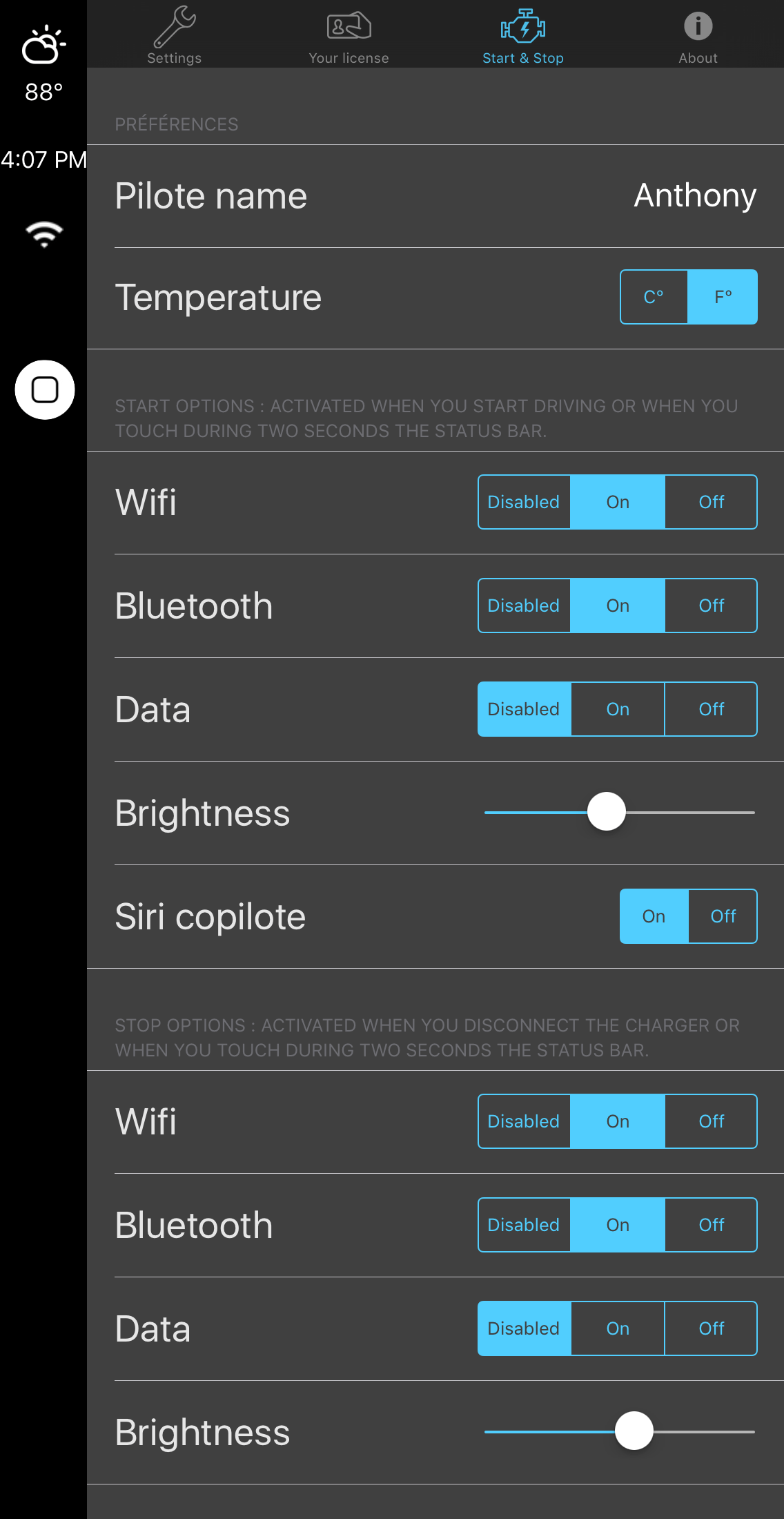
The app is separated into four tabs: Settings, Your License, Start & Stop, and About. The only tabs you’ll really mess with here are the Settings and Start & Stop tabs.
The Settings tab has most of your universal CarPlay iOS settings that let you configure the UI how you want it to look:
Among the things you can change here are:
The Start & Stop tab has feature configuration related to the new Start & Stop feature:
Here, you can configure the following options:
My thoughts on CarPlay iOS
CarPlay iOS is a tweak that lets you emulate the CarPlay UI on your iPhone or iPad. It’s limited in features, but it could provide you with a CarPlay-like experience if you were to get yourself a phone or tablet stand for your car’s dash or windshield.
Some of the features that have been implemented in version 2.0, such as Start & Stop, Fusion Mode, and support for Google Maps are sure to make this release far more desirable than the first, but it’s still probably going to be a tough sale. After all, the tweak isn’t free – you can download it for free from Cydia, but then you have to activate your license later on for a monetary amount.
For those who don’t want to spend hundreds of dollars on a CarPlay-supported head unit installation, this tweak provides a way to have some of the meat and potatoes of the features right on your device, and may be worth checking out if CarPlay was something you were looking into having.
Wrapping up
CarPlay iOS 2.0 is available in Cydia now. You can download the tweak for free from Cydia’s BigBoss repository, but when you do, you’ll need to activate your license later on for $4. You can also opt for the infinity license that can be transferred between multiple devices for $12.90, or opt for bulk licensing options.
Should you try this tweak? It depends on whether or not you want to experiment with CarPlay.
Let us know what you think about emulating the CarPlay experience directly on your iOS device in the comments below!
