iCatcher! by Joeisanerd, is a magnificent solution for downloading, streaming, subscribing to, and managing podcasts on iOS. If there is a specific feature that you are looking for in a podcast app, there is a good chance that it is already in iCatcher…
Key features
iCatcher displays an intuitive user interface for subscribing to podcasts. Users have the ability to search for a podcast (using an API in coordination with the iTunes directory). Finding podcasts by searching for the name, author, or keyword is relatively easy. However, unlike the iTunes directory, there isn’t a way to browse the official iTunes directory for podcasts, which makes discovering podcasts inside iCatcher limited.
iCatcher provides the ability to browse the web in search of a podcast’s RSS feed. Users can use this web browser to browse third-party directories, but not the official iTunes directory. Users also have the ability to manually enter a podcast feed, with authorization (username and password) support.
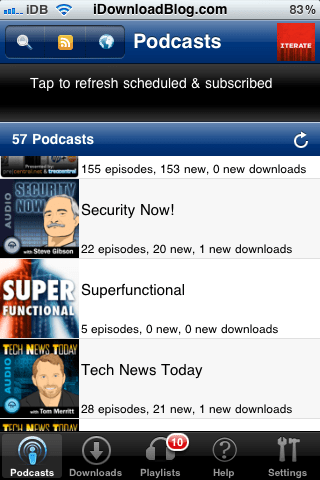
After all feeds finish refreshing, the podcasts begin downloading. iCatcher currently does not have support for simultaneous downloading, a feature ideal for users with capable network speeds.
After subscribing to a podcast feed, the user has the ability to view all episodes that exist in said feed. Users can stream or download old episodes, view show notes, refresh the individual feed (without refreshing all others), and edit settings for that individual podcast.

Other features
Unlike some other podcast applications, iCatcher has the ability to play a podcast at 4 different speeds. Users can choose to play their podcast at 1x, 1.25x, 1.5x, and 2x speeds. Currently .5x and 1.75x speeds are not supported.
iCatcher is a universal application that runs beautifully on the iPad, iPhone, and iPod touch. The application rarely crashes, and the developer updates the application on a regular basis. You get your money’s worth when buying iCatcher.
iCatcher supports AirPlay, so users can play podcasts at various speeds through their Apple TV and any other AirPlay supporting device.
iCatcher gives the user the ability to export their podcasts in a .OPML format. you may download a backup of my podcast feedsfrom here. I think you might enjoy some of them.
iCatcher is a top-quality universal podcast-consuming application for iOS that can bepurchased in the App Storefor $1.99. I use this application on my iPhone every day. In fact, it would be safe to say that it is the most used application on my iPhone.
The developer is good at responding to support and can befound on Twitter. You can also visit the developer’s websitehere.
If you like this application, consider supporting the developer by leaving a review in the App Store. I learn something new about iCatcher every day — it’s extremely feature-packed.
What do you think about this app? What application do you use to handle your podcasts?
